
WebSim AI
FreeWebSim AI generates functional web pages and interactive prototypes from natural language descriptions, rendering immediately in the browser.
📋 About WebSim AI
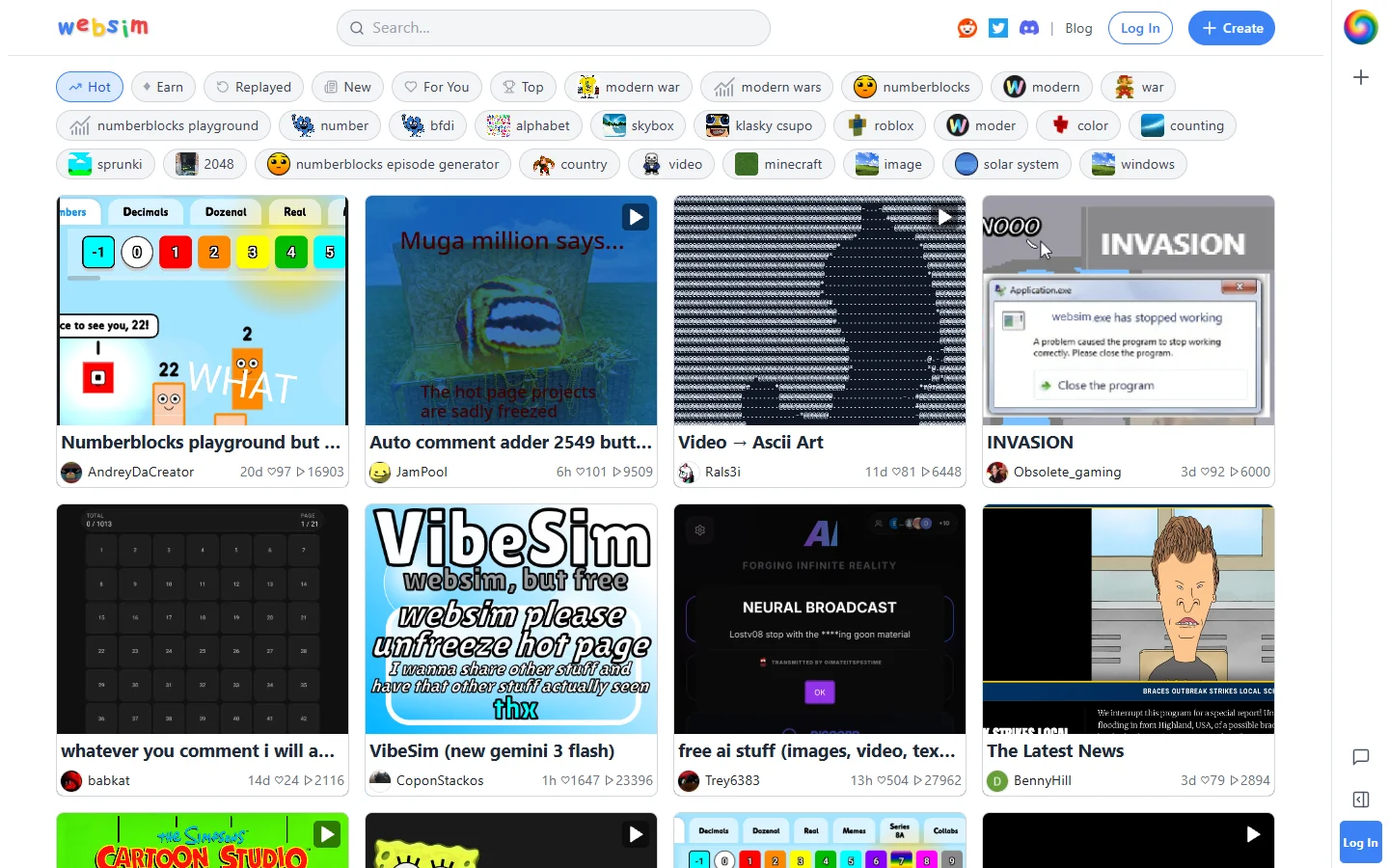
WebSim AI is a browser-based tool that generates functional web pages, interactive prototypes, and simulated web experiences from natural language descriptions. Users describe what they want — a landing page for a SaaS product, an interactive quiz, a dashboard layout, or a fictional website from a specific era — and WebSim AI produces HTML, CSS, and JavaScript that renders immediately in the browser. The tool is notable for handling unusual or creative prompts, including requests for websites that do not exist, alternate-history web experiences, and fictional interfaces that require both design and logic.
WebSim AI is free and does not require an account to generate basic pages, which has made it popular with developers prototyping ideas quickly, designers exploring layout concepts, and creative users building imaginative web experiences for entertainment or art projects. The generated code is viewable and editable, so technically capable users can use the output as a starting scaffold rather than a finished product. Iteration is supported through follow-up prompts that modify the existing page rather than regenerating from scratch.
The platform occupies a different niche than enterprise website builders — it is better understood as a rapid web generation sandbox than a production deployment tool. Pages are hosted within the WebSim environment and can be shared via link, but users who want production-grade hosting need to export the code and deploy it separately. Its strength is the speed and creative flexibility of generation rather than the polish of the output for live deployment.
⚡ Key Features of WebSim AI
Natural Language Web Generation
WebSim AI converts plain text descriptions into rendered HTML, CSS, and JavaScript pages without requiring the user to write any code. The description can be as simple as a one-line concept or as detailed as a multi-paragraph specification covering layout, color scheme, and interactive elements. The generated page appears in the browser immediately after the prompt is submitted. This makes web idea exploration accessible to non-developers as well as a fast scaffold tool for developers.
Interactive Prototype Output
Generated pages are not static mockups — WebSim AI produces functional interactive elements including buttons, forms, navigation menus, and basic JavaScript logic as specified in the prompt. This means prototypes behave like real web pages rather than image-based wireframes. Interactions can be demonstrated and clicked through, which is useful for stakeholder presentations or personal exploration of UX patterns. The functional output distinguishes WebSim AI from design-only mockup tools.
Iterative Prompt Refinement
After the initial page is generated, users can submit follow-up prompts to modify specific elements without regenerating the entire page from scratch. This allows incremental refinement of the design and functionality through natural language commands rather than manual code edits. Users can add sections, change colors, modify copy, or adjust layout by describing the change in a follow-up message. The iterative workflow is faster than editing generated code directly for users without strong CSS or JavaScript proficiency.
Code Visibility and Export
The HTML, CSS, and JavaScript generated by WebSim AI is viewable in a code panel alongside the rendered preview. Developers can inspect, copy, and modify the code to use it as a starting scaffold in their own development environment. This transparency makes WebSim AI useful as a code generation tool rather than just a black-box website builder. Exported code can be deployed on any standard web hosting platform.
Shareable Hosted Pages
Pages generated in WebSim AI are hosted within the platform and can be shared with anyone via a direct link without requiring any export or deployment steps. This makes WebSim AI useful for quickly sharing a prototype concept with collaborators or clients who need to interact with a demo rather than view a screenshot. Shared pages retain full interactivity since they render from the hosted code rather than as static images. Hosting persistence depends on the platform's current retention policies.
Creative and Fictional Web Experiences
WebSim AI handles prompts for fictional, alternate-history, or imaginative web experiences that have no real-world equivalent — such as a website from a fictional company in a novel, a retro internet experience from a different decade, or an interactive fiction interface. This creative range sets it apart from production-focused website builders that are constrained by real-world templates. Artists, writers, and game designers have used this capability to build interactive world-building artifacts. The platform treats creative prompts with the same generation quality as practical business website requests.
🎯 Use Cases for WebSim AI
⚖️ WebSim AI Pros & Cons
Advantages
- ✓Free with no account required for basic generation, making it immediately accessible without friction
- ✓Generates functional interactive pages rather than static mockups, making prototypes demonstrable
- ✓Iterative refinement via follow-up prompts avoids full regeneration for incremental changes
- ✓Code visibility lets developers use the output as a development scaffold rather than a black box
- ✓Handles creative and fictional prompts with the same quality as practical business requests
Drawbacks
- ✗Generated pages are not production-ready and require significant refinement before deployment in real-world applications
- ✗Complex layouts or custom business logic may require manual code intervention beyond what iterative prompting can achieve
- ✗Hosting persistence for shared pages depends on platform policies that may change over time
- ✗No built-in CMS, e-commerce, or database connectivity for functional web applications
📖 How to Use WebSim AI
Navigate to websim.ai and enter a description of the web page or prototype you want to generate in the prompt field.
Submit the prompt and wait for WebSim AI to generate and render the page in the browser preview panel.
Interact with the rendered page to test the generated interactive elements and assess whether the output matches your intent.
Submit follow-up refinement prompts to adjust specific elements such as layout, color, copy, or added sections.
Open the code panel to review the generated HTML, CSS, and JavaScript if you want to use the output as a development scaffold.
Copy the share link to send the hosted prototype to collaborators, or export the code to deploy on your own hosting platform.
❓ WebSim AI FAQ
WebSim AI is a free web generation tool that creates functional HTML, CSS, and JavaScript pages from natural language descriptions. It is used for rapid prototyping, creative web projects, and generating development scaffolds.
Yes, WebSim AI is free for basic page generation without requiring account creation. Specific usage limits and any premium tier features should be confirmed on the platform's current pricing page.
WebSim AI generates functional pages that can be exported and deployed, but the output is better suited as a prototype or scaffold than a finished production website. Significant refinement is typically needed before generated code meets production quality standards.
No, WebSim AI is designed for natural language input so you can describe what you want without writing code. Users with coding knowledge can inspect and modify the generated code, but it is not required to generate and iterate on pages.
Yes, WebSim AI generates functional JavaScript alongside HTML and CSS, so pages include working buttons, forms, navigation, and other interactive elements. The result behaves like a real web page rather than a static design mockup.
Related to WebSim AI

Base44 AI
Base44 AI is an AI app builder and website builder that generates full-stack web applications from natural language descriptions with backend, database, and UI included.

Rork AI
Rork AI is an AI app builder that generates functional mobile and web applications from natural language prompts, targeting non-developers and rapid prototypers.
Featured on WhatIf.ai
Add this badge to your website to show you're listed on WhatIf AI
Alternatives to WebSim AI

Base44 AI
Base44 AI is an AI app builder and website builder that generates full-stack web applications from natural language descriptions with backend, database, and UI included.

Browse AI
Browse AI is a no-code web scraping and monitoring tool that extracts structured data from any website and tracks changes over time without writing code.

Cantina AI
Cantina AI is a freemium platform for building and deploying full-stack web applications using AI-assisted development with live preview and one-click deployment.

ChatGPT
ChatGPT AI assistant by OpenAI for writing, coding, research, image analysis, and everyday problem-solving.